We built deer detection into DriveSight. Then we turned it off.
- Over 1.5 million deer-vehicle collisions occur in the US annually, according to State Farm claims data.
- The peak danger window is dusk and dawn in October–December, when deer are most active and visibility is lowest.
- DriveSight does not detect deer. We shipped a deer model, watched it produce confident false positives, and disabled it. It is still switched off in the code today.
- What we shipped instead is a spoken wildlife hotspot warning, built from reported sightings, that fires before you reach a stretch where animals have been seen.
- The on-device object detection is real and still runs: people, cars, trucks, motorcycles and brake lights, at roughly 7 frames per second, entirely on your phone with no cloud.
Deer cause over 1.5 million vehicle collisions in the United States every year. The vast majority happen at dusk and dawn, in the same 15-second window where your headlights illuminate the road but your eyes have not fully adjusted to the dark. By the time you register the animal, you have already closed most of the distance.
The obvious thing to build against that is a camera that spots the deer for you. We built it. It did not work well enough to ship honestly, so it is switched off, and this page explains why, because the question "do deer detection apps actually work" deserves a straight answer from someone who tried to make one.
What follows is what the detection genuinely does, what it cannot do, and the smaller feature that survived and is actually useful in deer season.
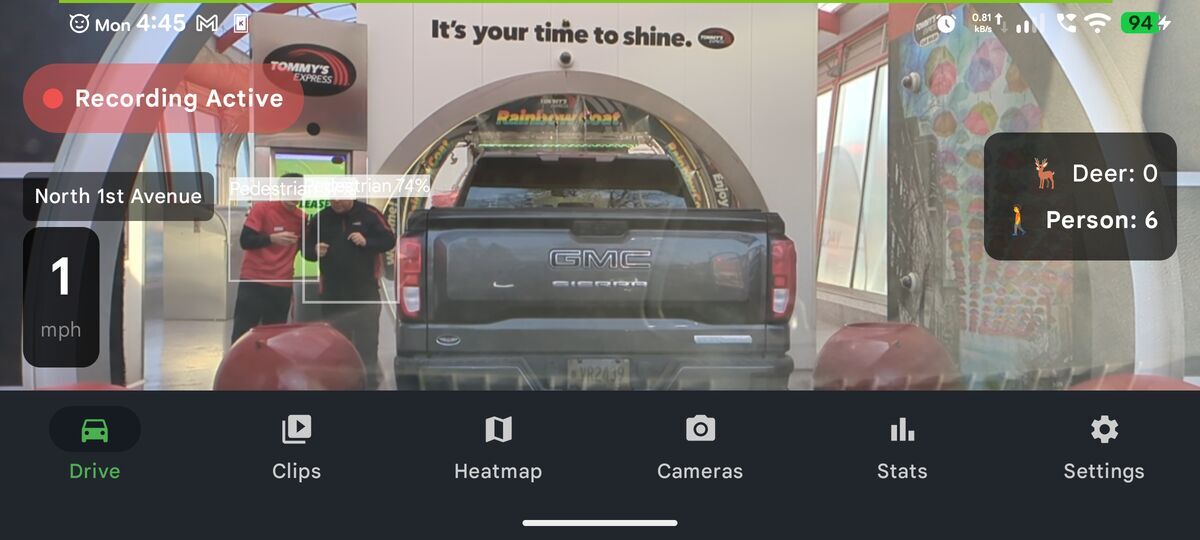
YOLO26 detection running in real-time on a live dashcam feed
The Model: YOLO26 Running Locally on Your Phone
DriveSight uses a model called YOLO26 Nano, exported to TensorFlow Lite and executed entirely on your phone's CPU using XNNPACK acceleration. There is no cloud processing, no latency from a server round-trip, and no internet connection required. The model analyzes frames at approximately 7 frames per second and draws bounding boxes on anything it identifies.
YOLO (You Only Look Once) is a family of real-time object detection models used in autonomous vehicle research. The Nano variant is the smallest and fastest version, designed specifically for edge devices with limited compute. On a modern Android phone it runs fast enough to be useful as a live warning system, not just a recording device.
Why Deer Are Hard to Detect
The COCO Class Problem
YOLO26 was trained on the COCO dataset, which contains 80 object classes. Deer is not one of them. COCO was built primarily from images of urban environments where deer do not appear.
In practice, a deer standing at the side of a rural road gets classified as whichever animal it most closely resembles in the training data. At dashcam distance and resolution, that is often "horse," "sheep," or "cow." The shape is similar. The silhouette is similar. The algorithm does not know what a deer looks like, but it recognizes that a large four-legged animal is standing in the road.
For a while DriveSight did exactly what that suggests: it remapped horse, sheep, cow, elephant, zebra and giraffe to a single "Deer" alert, on the theory that any large four-legged shape at the roadside is worth warning about.
We removed it. The note that replaced it in our source is blunt: mapping those classes was "producing tons of false positives on trees, bushes, and random shapes at low confidence." A warning that fires at roadside bushes is worse than no warning, because you learn to ignore it, and then it is worthless on the night it is right.
The Distance Problem
A deer standing 200 meters ahead on a rural highway appears as roughly 15 pixels tall in a 640×640 pixel model input. At that size, texture and color information is mostly lost. The model is working almost entirely from shape and position in the frame.
DriveSight does run a second YOLO pass when the primary scan finds nothing: it crops and zooms into the road-ahead region and re-analyzes it at double the effective resolution. That machinery is real and it still runs today, and it helps with small distant objects in general.
What it could not fix is the underlying problem. Doubling the resolution of a 15-pixel shape gives you a 30-pixel shape, and 30 pixels of a dark animal against a dark verge, lit only by your own headlights, is still not enough for a small model to tell a deer from a fence post with any confidence you would want to act on.
How the two-pass system works: Pass 1 analyzes the full frame at 640×640. If no animal is found, Pass 2 crops the road-ahead zone (the upper 65% of the frame, centered horizontally) and scales it back to 640×640. The same animal that measured 15px in Pass 1 now measures 30px in Pass 2 — twice the detail, same model, better chance of detection.
The Dedicated Deer Model, and Why It Is Switched Off
The class remap was the first attempt. The second was a model trained specifically on deer, exported from Open Images V7, running alongside the general detector. A model with one class, whose only job is to find deer, should beat a general model guessing "horse."
It did not. It produced confident false positives indoors: whole-room bounding boxes labelled deer, and cats labelled deer. A model that calls a cat a deer on a sofa will call something a deer on a dark road, and it will do it with high confidence, which is the worst failure mode available.
The model is still in the app, behind a disabled branch. The note in our source explains the decision in one line: leave it off "so the app doesn't lie to the driver." Until it is retrained with hard negatives, or replaced with something like MegaDetector, it stays off.
So, the honest summary: DriveSight has no working deer detection. Any dash cam app claiming otherwise on a phone camera is making a claim we could not make work with a model dedicated to the task.
What We Shipped Instead: Wildlife Hotspot Warnings
The feature that survived does not look at the road at all. It looks at where animals have already been.
Sightings are recorded and pooled, and stretches of road that accumulate them become hotspots. When your GPS position approaches one, DriveSight speaks a warning before you get there: wildlife hotspot ahead, slow down.
This is a much less impressive feature and a much more useful one. It does not need to see the animal, it does not depend on your headlights, it works around a blind curve, and it gives you the one thing that reliably prevents a deer collision, which is a reason to be going slower before you arrive. It is the part I would tell a rural driver to rely on.
The other half is what happens if you hit one anyway. Loop recording stamps speed and time on every clip, impact detection locks the clip so the loop cannot overwrite it, and the clip can back up to your own Google Drive. Deer collisions turn into insurance conversations, and that footage ends the argument about fault.
Brake Light Detection
Deer collisions are not the only wildlife-related hazard on rural roads. Sudden braking by the car ahead — because they spotted something you cannot yet see — is often the first warning that an animal is in the area.
Real-Time Brake Light Recognition
DriveSight analyzes the lower rear portion of vehicles in front and tracks changes in red light intensity between frames. When a vehicle's brake lights activate, the red intensity in that zone jumps sharply. The app detects this jump and flags the vehicle as braking.
The detection handles two scenarios:
- Sudden braking: The brake intensity increases by 35% or more from one frame to the next. This catches emergency stops from vehicles that were moving normally.
- Already braking when first detected: If a vehicle enters the frame already at full braking, there is no jump to measure. The app catches this with an absolute intensity threshold — if the red zone score is already high, it marks the vehicle as braking regardless of whether you observed the transition.
The practical use case: you are driving on a two-lane road at night, there is a car a quarter mile ahead, and it stops suddenly. DriveSight sees the brake lights before you consciously process them and triggers an alert.
What Gets Detected and What Does Not
What the Active Model Reports
These are the classes DriveSight actually surfaces today. Every wild-animal class has been removed from this list on purpose, for the reasons above:
- People — pedestrians and cyclists near the road
- Vehicles — cars, trucks, buses and motorcycles, with brake light state
- Road furniture — traffic lights and stop signs
- Cats and dogs — the two domestic animals the model identifies reliably enough to report
Deer, elk, bear, moose and other wildlife are not in that list. The bear class was removed as well: real bears on roads are rare in the lower 48, and the COCO bear class is a false-positive magnet for tabby cats and rubbish bags.
Current Limitations
The model runs at 7 frames per second. At 60 mph, you travel approximately 12 meters between analyzed frames. Very fast-moving animals crossing directly in front of the vehicle may not be captured before impact.
The model also does not perform well with animals that are fully behind vegetation or guardrails. Only the visible portion of an animal contributes to the confidence score, and a deer with only its legs visible below a guardrail will typically not be detected.
Night detection relies on your headlights. The model uses color and edge information from the lit road ahead. In complete darkness beyond your headlight range, animals will not be detected.
Why a Phone Runs This Better Than a Dedicated Dashcam
No hardware dashcam on the market under $500 runs real-time AI object detection. The processors inside budget and mid-range dashcams — typically Novatek or Ambarella chips — are optimized for video encoding, not neural network inference. They have no neural processing unit and their GPU cores are too limited for YOLO-class models.
A Snapdragon 700-series phone chip, which is three or four years old at this point, has a dedicated Hexagon DSP that runs TensorFlow Lite operations efficiently. Older Pixel phones, Galaxy A-series phones, and most Android devices made after 2020 have enough compute to run YOLO26 Nano at a frame rate that is useful for driving.
Frequently Asked Questions
Does DriveSight specifically identify deer or just large animals?
Neither, as of today. The class remap that turned horse, sheep and cow detections into a "Deer" alert was removed because it fired on trees and bushes, and the dedicated deer model is disabled because it produced confident false positives. The active model reports people, vehicles, traffic lights, stop signs, cats and dogs. The deer feature in the app is the spoken wildlife hotspot warning, which is based on reported sightings rather than the camera.
How far ahead does the AI detect animals?
It does not detect wild animals at all. For the objects it does report, such as vehicles and people, range depends on size and lighting, and a second zoom pass over the road-ahead region helps with smaller distant objects. For deer specifically, the useful warning is the hotspot alert, which fires on GPS position before you reach a stretch with reported sightings, not on anything the camera sees.
Does this work at night?
The object detection works at night only within your headlight range, because the model can only analyse what the camera can see. This limit is a large part of why deer detection was abandoned: the animals that matter are usually at or beyond the edge of the lit zone. The hotspot warning is unaffected by darkness, since it works from GPS position and reported sightings.
Is the AI detection always running?
Object detection is a Pro feature and runs in a separate processing thread while recording, so it does not interrupt the recording pipeline, and its frame rate adjusts with phone temperature to prevent overheating. It reports people, vehicles, road furniture, cats and dogs. It does not report deer.
When is deer season for drivers?
October, November and December. The rut moves deer at dusk and dawn, which is when most people commute, and November is the worst single month for deer strikes in the United States. One deer crossing usually means more are coming. Slow down, use high beams on empty roads, and brake in a straight line rather than swerving.
Do deer alerts really work?
It depends which kind. Deer whistles mounted on the bumper have not changed deer behavior in controlled tests, and there is no evidence they prevent collisions. What DriveSight offers is narrower and honest: a spoken wildlife hotspot warning before you reach a stretch with reported sightings. It does not need to see the animal, because it is built from where deer have been seen and hit, not from the camera. Do not count on any phone camera to spot a deer in time. Treat the hotspot warning as the cue to slow down, and slowing down as the thing that works.
Is there a deer whistle app?
Phone speakers cannot produce the ultrasonic tones deer whistles claim to make, and there is no evidence those tones work anyway, so DriveSight does not try. It warns the driver instead, with a spoken hotspot warning before a stretch with reported sightings, and if a collision happens it locks the crash clip with speed and time stamped on it for the insurance claim.
Try it on your phone
DriveSight is free on Google Play. Loop recording, crash detection and parking mode cost nothing. The wildlife hotspot warning rides on the same alert map as the police and camera alerts, which is the Pro part.
Download DriveSight Free